


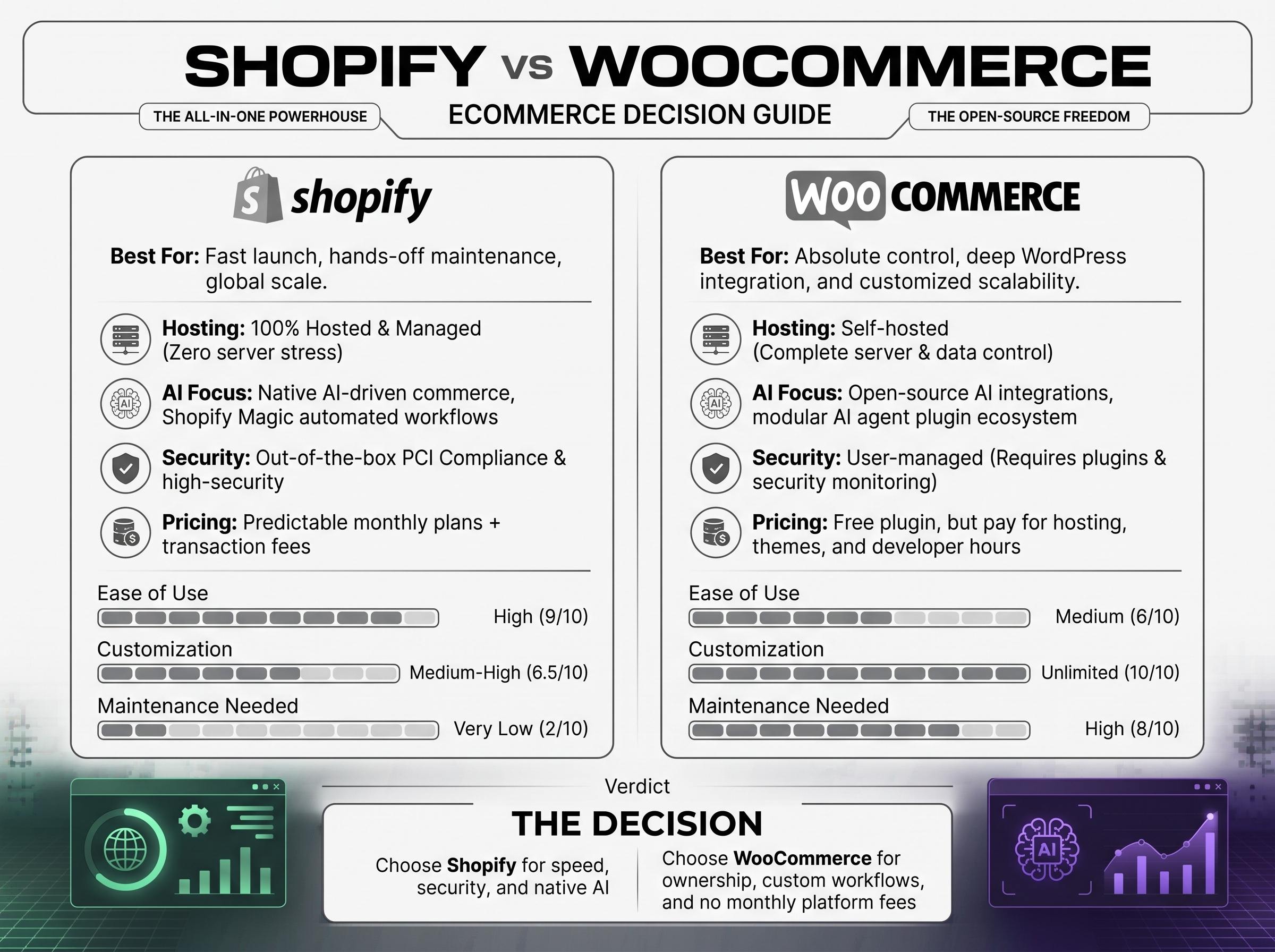
Choosing between Shopify vs WooCommerce in Pakistan is really a choice between two ways of running a store. Shopify is a hosted platform: you pay a subscription and Shopify handles hosting, security patches, and core infrastructure. WooCommerce is a free plugin for WordPress: you own and manage the hosting, plugins, and maintenance, in exchange for more control.
The short answer: Shopify is usually better for businesses that want to launch fast, keep costs predictable, and avoid technical upkeep. WooCommerce is usually better for businesses that want deep customization, already run WordPress, or publish a lot of content. Neither is universally better. This guide compares setup, pricing, SEO, security, payments, scalability, and exit options so you can decide based on your own situation.
Shopify vs WooCommerce in Pakistan at a Glance
| Factor | Shopify | WooCommerce |
|---|---|---|
| Model | Hosted, all-in-one SaaS | Open-source plugin for self-hosted WordPress |
| Software cost | Monthly subscription (see pricing section) | Free core plugin |
| Hosting | Included | You buy it separately |
| Setup | Guided; fast for standard stores | Needs WordPress, hosting, theme, and plugin setup |
| Customization | Strong within themes and apps; deeper changes need Liquid code or app development | Very high; almost anything can be changed in code |
| SEO | Solid built-in basics; some fixed URL patterns | Full URL and template control; quality depends on setup and hosting |
| Security and updates | Platform level handled by Shopify; you manage apps and staff access | You manage updates, backups, and hardening |
| Payments | Shopify Payments (where available) plus third-party gateways, which can carry an extra Shopify fee | Many gateways; WooCommerce adds no transaction fee of its own |
| Scalability | Scales on Shopify’s infrastructure via higher plans | Scales with the hosting and engineering you provide |
| Ownership | Store runs on Shopify’s platform | You own the files and database |
| Typical extras | Paid apps and themes | Paid plugins, themes, hosting, developer time |
Built-in features and paid extras differ on both sides. Shopify includes hosting, checkout, and basic reporting, but many specialized needs (subscriptions, advanced filtering, reviews) come from apps that often have monthly fees. WooCommerce includes core store management, but nearly every real store adds plugins for SEO, security, caching, and backups, some free and some paid.
What Is Shopify?
Shopify is a subscription ecommerce platform. You sign up, choose a plan, pick a theme, and manage products, orders, and customers from one dashboard. Hosting, SSL, the checkout, and platform updates are handled for you.
Strengths: quick launch, a polished checkout, a predictable subscription, a strong app ecosystem, and built-in tools for selling across online and physical channels.
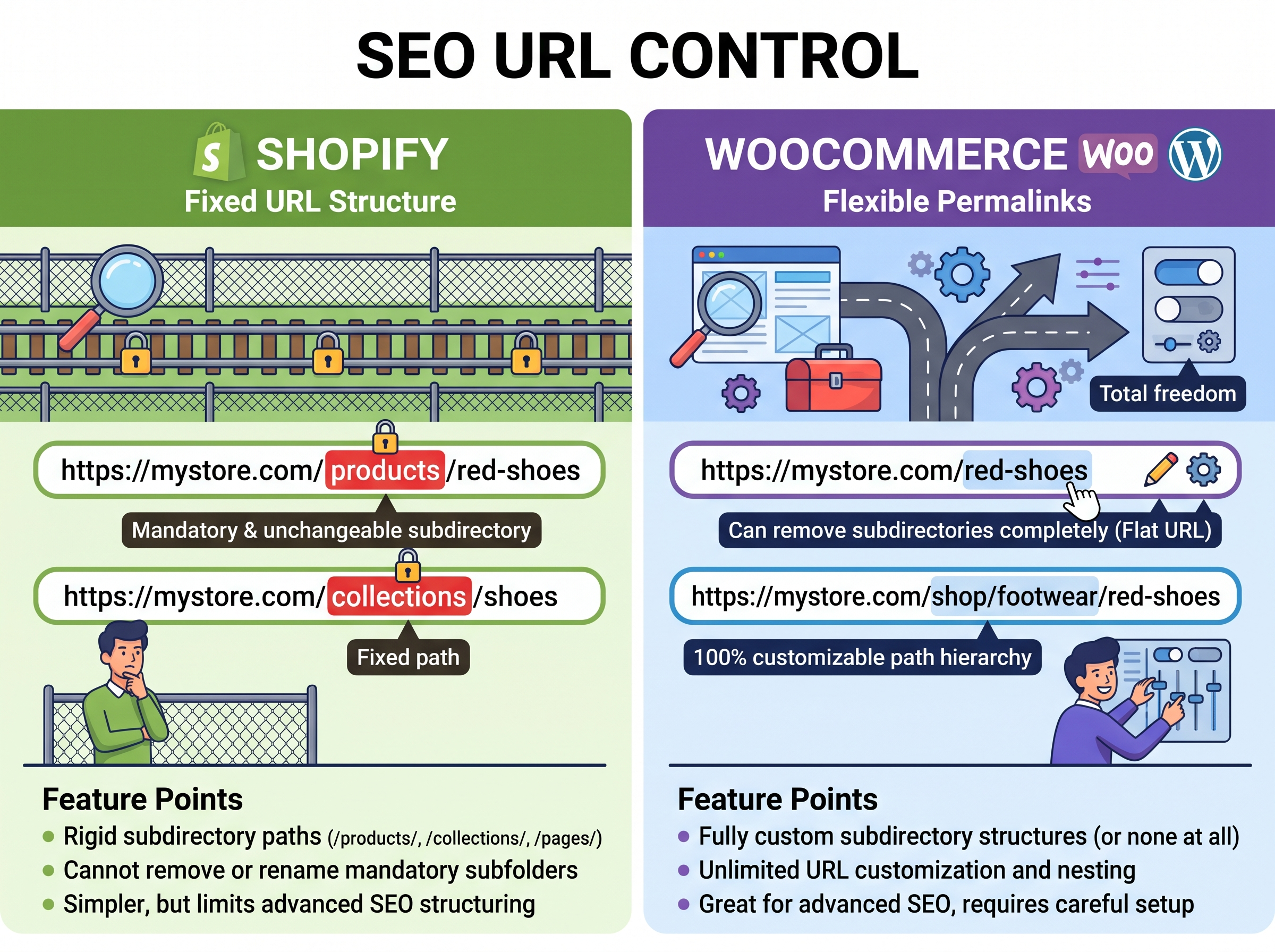
Limitations: monthly fees rise with your plan, apps add recurring costs, some URL patterns (such as the /products/ and /collections/ prefixes) are fixed, and deep checkout or backend changes are restricted on lower plans.
Best for: first-time sellers, small teams without in-house developers, and brands that want to spend their time on products and marketing instead of server management.
What Is WooCommerce?
WooCommerce is an open-source ecommerce plugin that turns a WordPress website into an online store. The plugin itself is free, but you need WordPress hosting, a domain, a theme, and usually several plugins. You are responsible for updates, backups, security, and performance, either yourself or through a developer or managed host.
Strengths: near-total control over design and functionality, no platform subscription or WooCommerce transaction fee, and the strength of WordPress as a content platform.
Limitations: more setup and ongoing maintenance, quality that varies with hosting and plugin choices, and plugin conflicts that can cause problems when updates are not tested.
Best for: businesses with WordPress experience or developer support, content-led brands, and stores with unusual requirements.
Shopify vs WooCommerce in Pakistan: Detailed Comparison
Ease of Use and Setup
Shopify is easier to start with. The dashboard is consistent, themes are built for the platform, and you do not choose hosting. A simple store can be live quickly.
WooCommerce asks for more decisions: hosting, theme, payment plugin, caching, security, and backups. That is manageable for someone who knows WordPress, and a benefit for those who want control. For a non-technical owner working alone, it is a bigger commitment.
What this means for you: if your time is the scarce resource, Shopify’s simplicity is worth real money. If you have a developer or WordPress skills, WooCommerce’s setup effort is largely a one-time investment.
Pricing and Total Cost of Ownership
Shopify costs are visible and recurring; WooCommerce costs are spread across hosting, plugins, and development. The full breakdown is in the pricing section below.
Design, Themes, and Customization
Both platforms offer free and paid themes. Shopify themes are built on Liquid and are generally reliable out of the box; going beyond theme settings usually means editing theme code or adding apps. WooCommerce works with WordPress themes and page builders, and any behavior can be changed with custom code.
What this means for you: a standard catalog and a clean design fit either platform. Custom product configurators, unusual checkout logic, or complex B2B pricing are easier to shape without platform constraints on WooCommerce, though Shopify can handle many of them through apps and custom development.
SEO Capabilities and Content Marketing
Both platforms can rank well. The details are in the SEO section below.
Security, Updates, and Maintenance
On Shopify, the platform handles hosting security and core updates. You still manage app permissions, staff accounts, and theme code.
On WooCommerce, you maintain the whole stack: WordPress core, WooCommerce, the theme, plugins, the PHP version, backups, and malware protection. Most problems come from outdated or poorly maintained plugins and weak hosting rather than from WooCommerce itself.
What this means for you: WooCommerce is not inherently insecure, but it needs a maintenance plan. If nobody owns updates and backups, choose Shopify or budget for managed hosting and ongoing support.
Payment Gateways and Transaction Fees
Shopify Payments is available only in certain countries, and rates vary by plan. If you use an outside payment provider instead, Shopify adds its own fee on top of the provider’s fees. Third-party summaries list that extra fee as 2% on Basic, 1% on Grow, 0.6% on Advanced, and 0.2% on Plus. Confirm current rates on Shopify’s pricing page.
WooCommerce charges no transaction fee of its own. You pay only your gateway’s fees (for example WooPayments, Stripe, or PayPal), which for U.S. cards are commonly listed at around 2.9% plus 30 cents. Gateway availability and rates vary by country and account.
What this means for you: payment cost mostly depends on your country, gateway, and volume. Compare your expected order values and payment mix, not headline percentages.
Plugins, Apps, and Integrations
Shopify’s App Store is curated and integrates with the dashboard, but many apps charge monthly fees that add up. WooCommerce draws on the large WordPress plugin ecosystem, with free and paid options and more flexibility, but variable quality and a higher risk of conflicts.
What this means for you: list your must-have features (subscriptions, bookings, ERP or CRM connection, multi-warehouse inventory) and price them on each platform before deciding.
Performance and Website Speed
Shopify provides managed infrastructure, so baseline speed is consistent, though heavy themes and many apps can still slow a store. WooCommerce speed depends heavily on hosting quality, caching, image handling, theme code, and plugin load. A well-tuned WooCommerce site can be fast; a poorly hosted one will not be.
Scalability and Business Growth
Shopify scales through plan tiers and, for large brands, Shopify Plus (listed from about $2,300 per month on a multi-year term). WooCommerce can handle large catalogs and heavy traffic, but only with suitable hosting, caching, database optimization, and engineering support.
What this means for you: Shopify scales with money; WooCommerce scales with money and technical expertise. Both can support serious businesses.
Data Portability and Platform Flexibility
WooCommerce gives you direct access to your files and database. Shopify allows exports of products, customers, and orders, but the platform itself is not portable. Migrating in either direction is possible: products and customers usually transfer via CSV or migration tools, but customer passwords, some order history, reviews, and app-specific data need a plan, and URL redirects are essential to protect search traffic.
Shopify vs WooCommerce in Pakistan Pricing: What Will You Actually Pay?
The common shorthand, “Shopify costs a subscription and WooCommerce is free,” is misleading. Here is how each is actually built up.
Shopify cost components
- Subscription: third-party summaries in 2026 list Starter at $5 per month, Basic at $39 monthly or $29 billed annually, Grow at $105 or $79, Advanced at $399 or $299, and Plus from about $2,300. Annual billing saves roughly 25% on the middle tiers. New merchants have recently been offered a short trial followed by a promotional $1 per month period; check whether it is still available.
- Payment processing: a percentage plus a fixed fee per transaction, lower on higher plans, plus extra fees on some international or third-party-gateway sales.
- Themes and apps: many themes are free, premium themes are paid, and apps are commonly monthly subscriptions.
- Domain, development, and migration: custom design, integrations, or data migration are project costs.
WooCommerce cost components
- Core plugin: free, with no revenue share and unlimited products.
- Hosting: WooCommerce’s own pricing page cites roughly $25 to $350 per month for most stores, rising with traffic and performance needs.
- Domain and SSL: domains cost money; SSL is free with most hosts.
- Themes and extensions: many are free; premium ones typically have annual licenses.
- Payment processing: gateway fees only.
- Development and maintenance: setup, custom features, updates, security, and support, either in-house or outsourced.
So which is cheaper? It depends on your assumptions. A small store with simple needs may pay less on a low-cost Shopify plan than for reliable managed WooCommerce hosting plus maintenance. A higher-volume store might save on WooCommerce by avoiding plan tiers and third-party-gateway fees, but pay more for hosting and developers. Build your own 12-month estimate: platform, hosting, apps or plugins, payment fees at your expected sales, and developer time.
Shopify vs WooCommerce in Pakistan for SEO
Neither platform ranks better automatically. Rankings depend on content quality, site structure, speed, links, and how well the store is built.
- URLs: WooCommerce offers complete permalink control. Shopify uses fixed prefixes for products, collections, and pages, which is fine for most stores but less flexible.
- Metadata and structured data: both support editable titles and descriptions. Product structured data depends on the theme, app, or plugin used, so test it.
- Redirects and sitemaps: Shopify generates an XML sitemap and supports URL redirects. WooCommerce relies on WordPress plus an SEO plugin for sitemaps and redirect management.
- Page speed: Shopify provides a consistent baseline; WooCommerce depends on hosting and optimization. Heavy themes and extras hurt both.
- Content publishing: WordPress is a stronger content management system, with richer taxonomies and editorial workflows. Shopify’s blog is capable but simpler.
- Technical flexibility: WooCommerce lets a developer adjust almost anything. Shopify’s constraints reduce some risk but also some options.
What this means for you: if content marketing is central to your growth, WordPress and WooCommerce are a natural pairing. If you want solid SEO basics without technical work, Shopify covers them.
Which Platform Is Better for Different Business Types?
- Beginners launching a first store: Shopify, for its guided setup and low maintenance.
- Small businesses with limited technical resources: Shopify, unless you have a trusted developer or agency on retainer.
- Content-heavy businesses and WordPress publishers: WooCommerce, since the store lives inside your existing site and editorial workflow.
- Businesses needing extensive customization: WooCommerce, or Shopify with custom development. Scope the specific requirements first.
- Growing brands with complex operations: either, depending on integrations. Shopify Plus suits many; WooCommerce suits teams with engineering capacity.
- International sellers: compare multi-currency, tax, language, and payment support on both, and check local gateway availability.
- Existing WordPress site owners: WooCommerce is the lower-friction path, though Shopify can still run alongside a WordPress site.
Shopify vs WooCommerce in Pakistan: Pros and Cons
1. Shopify pros
- Fast, guided launch
- Hosting, SSL, and core security handled
- Predictable subscription
- Strong checkout and app ecosystem
2. Shopify cons
- Recurring plan and app costs
- Extra fees on third-party gateways
- Fixed URL structure and some customization limits
- Platform lock-in
3. WooCommerce pros
- Free core software and no platform transaction fee
- Very flexible design and functionality
- Excellent for content and SEO control
- You own your data and files
4. WooCommerce cons
- You manage hosting, updates, and security
- Costs are spread across several vendors
- Plugin conflicts and performance risks
- More setup time
Shopify vs WooCommerce in Pakistan: Which One Should You Choose?
- Choose Shopify if you want to launch quickly, prefer one monthly bill, have no technical team, and value low maintenance.
- Choose WooCommerce if you already use WordPress, need custom functionality, want full control of SEO and data, and have a developer or managed host.
- If your budget is tight, compare real totals rather than headline prices, and include your own time.
- If you expect rapid growth, plan for the next two years: plan tiers and app fees on one side, hosting and engineering capacity on the other.
- If you are unsure, list your must-have features, expected order volume, and who will maintain the store, then test the fit with a prototype or a short consultation.
How GenXe Can Help You Choose the Right Ecommerce Platform
GenXe provides web development and digital solutions, including custom ecommerce website development, Shopify development, WooCommerce development, WordPress development and website design.
The platform decision is easier when it is based on your products, budget, and team rather than a generic ranking. A professional build can help with choosing the right platform, responsive design, payment gateway integration, SEO-friendly site structure, performance optimization, and support after launch.
If you are comparing Shopify and WooCommerce for a new store, or considering a migration, talk to GenXe about your requirements. Share your product range, expected order volume, and any systems you need to connect, and we will help you weigh the options.
Need help deciding between Shopify and WooCommerce?
Contact GenXe today for expert advice and a free consultation.
Call Us: +92 300-5624325
Frequently Asked Questions
Not universally. Shopify is better for speed, simplicity, and low maintenance. WooCommerce is better for control, customization, and WordPress-based content strategies.
Sometimes. The plugin is free, but you pay for hosting, extensions, and maintenance. Small stores often find Shopify’s all-in-one pricing comparable or cheaper; higher-volume or heavily customized stores may find WooCommerce cheaper. Compare 12-month totals.
Neither guarantees rankings. WooCommerce offers more URL and technical control plus WordPress’s content tools; Shopify offers solid built-in basics with less setup. Results depend on content, speed, and implementation.
Yes for most beginners, because hosting, security, and updates are handled for you. WooCommerce is manageable if you already know WordPress.
Yes, with suitable hosting, caching, database optimization, and technical support. Performance at scale depends on the infrastructure and code behind it.
Yes. Products, customers, and orders can usually be moved with CSV exports or migration tools. Plan for password resets, review and app data, design rebuilds, and 301 redirects to protect search traffic.
Shopify suits most small businesses without technical resources. WooCommerce suits small businesses that already run WordPress or need custom functionality and have support to maintain it.
Read More:
Web Development Company in Lahore
Web Designer in Lahore, Pakistan
Best Web Development Agency in Lahore